How to Change Your XM IB on an Existing Account
Already have an XM account but are not receiving cashback? You do not need to close it. Open a new trading account under our IB instead.
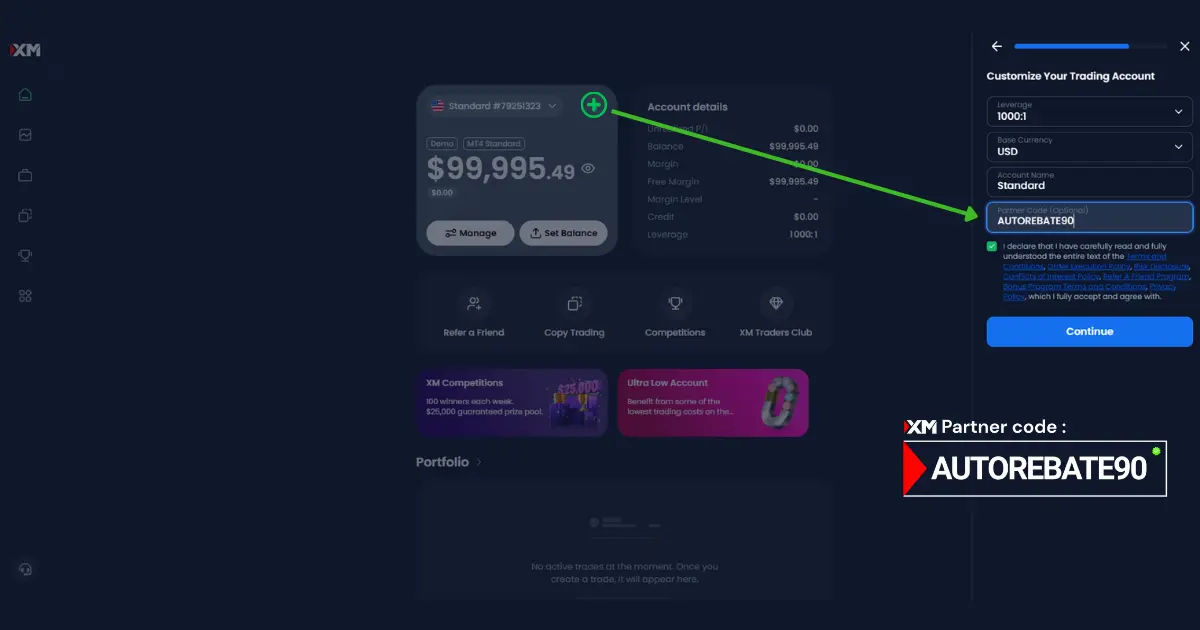
Note: XM does not allow the IB on an existing trading account to be changed. The solution is to open a new MT4 or MT5 account from your Members Area.
Frequently Asked Questions
Can I change the IB on my existing XM account?
Yes. You can either open an additional trading account under AUTOREBATE90 from your XM Member Area, or ask XM support to move your existing account to our partner code.
Do I need to close my old account first?
No. Your existing account, balance, and open trades stay as they are. Changing the IB only changes which partner your account is linked to.
What is the easiest way to switch to AUTOREBATE90?
The easiest way is to open an additional account: log in to your XM Member Area, click the + button in the accounts section, and enter AUTOREBATE90 in the Partner Code field.
Will my trading conditions change after switching IB?
No. Your spreads, leverage, and account conditions stay exactly the same. The only difference is that 90% of the IB commission is returned to you as cashback.
How long does the IB change take?
Opening an additional account is instant. If you ask XM support to move an existing account, it usually takes one to two business days.
Can I change IB if I have open trades?
Yes, but it is safer to close open positions first so there is no interruption. An additional account has no such issue since it is a fresh account.
I registered without a partner code. Can I still get cashback?
Yes. Follow this guide to link your account to AUTOREBATE90, either by opening an additional account or by contacting XM support to update your IB.
Does changing the IB cost anything?
No. Changing your IB or opening an additional account is completely free and does not add any fees to your trading.
How do I know the switch worked?
Use the Check My Rebate page on our site and enter your XM account number. If it shows as registered under our partner code, your cashback is active.
Need more help?
Check your rebate status anytime or contact our team if you need assistance.