How to Withdraw XM Cashback to Your Bank Account
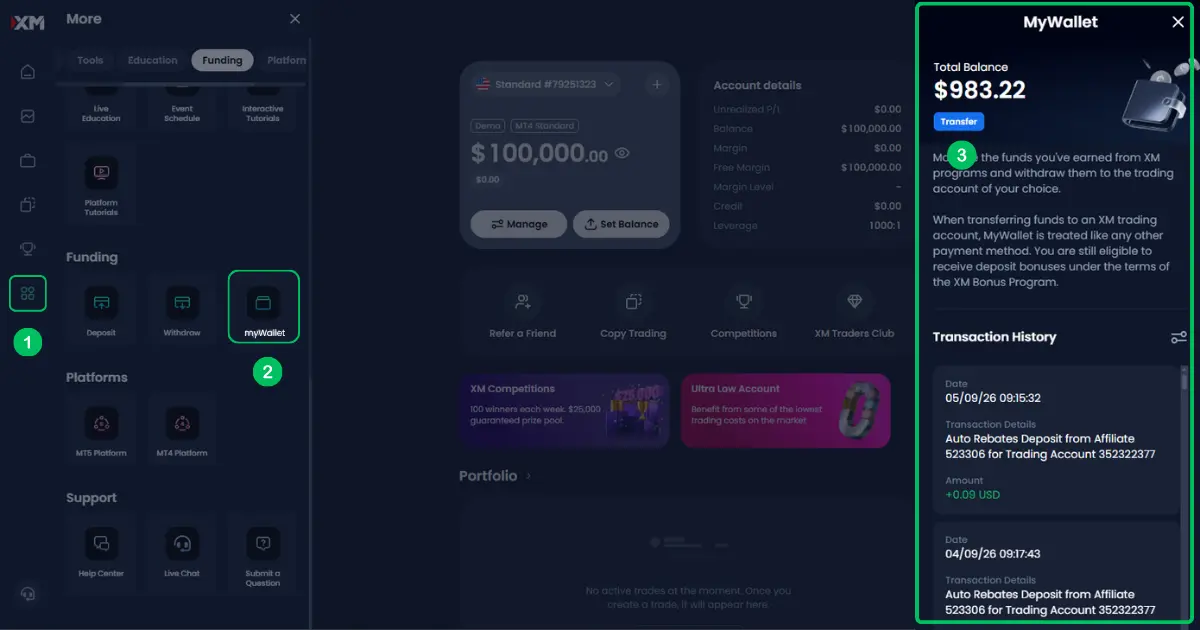
Our cashback is auto-credited directly to your XM Wallet, so no manual claim is required. Follow these steps to withdraw it.
Frequently Asked Questions
Where does my cashback go?
Your cashback is credited automatically to your XM myWallet. From there you can withdraw it to your bank account or transfer it to a trading account.
How do I withdraw my cashback to my bank?
Log in to your XM Member Area, open myWallet, choose Withdraw, select your bank account, enter the amount, and confirm. The steps are shown in this guide.
Is there a minimum withdrawal amount?
XM applies a small minimum withdrawal depending on the payment method. Check the withdrawal page in your Member Area for the current minimum for your bank.
How long does a withdrawal take?
Withdrawals are usually processed by XM within 24 hours on business days. The time for the money to reach your bank depends on your bank, often one to three business days.
Are there any withdrawal fees?
XM generally does not charge withdrawal fees for standard bank transfers above the minimum amount. Your bank may apply its own receiving or conversion fees.
Can I withdraw to a different bank account?
For security, withdrawals usually must go to a bank account in your own name. You can add or change your bank details in the XM Member Area.
Can I move my cashback to a trading account instead?
Yes. In myWallet you can transfer your cashback to any of your XM trading accounts instantly, instead of withdrawing it to a bank.
Why is my withdrawal still pending?
Pending withdrawals are usually waiting for XM's processing or a verification check. If it takes more than a few business days, contact XM support with your transaction reference.
Do I need to verify my account before withdrawing?
Yes. Your XM account must be fully verified before you can withdraw. Make sure your ID and proof of address have been approved.
Need more help?
Check your rebate status anytime or contact our team if you need assistance.